AWK on Linux: A Text Processing Language with Examples.
09 Jun 2026, 20:08:04
Most operations on Linux and Unix systems involve managing text streams. Commands, configuration files, logs, and data input and output - all of these are text that we need to manage.To effectively manage text data, the specialized programming language AWK was created in 1977. The name comes from the first letters of the authors’ last names: Alfred Aho, Peter Wainberger, and Brian Kernighan.
Decades later, AWK remains one of the core tools for working with Linux and Unix systems and is included in the standard software package of many distributions based on them.
In this article, we will look at the syntax, basic parameters, and specific examples of how this popular language is used.
How AWK Works
The AWK utility’s speed stems from its ability to read an input stream or file line by line, regardless of the size of the input data stream. The program’s operating model is based precisely on this:- Reading a line;
- Splitting a string into fields;
- Check terms and conditions;
- Performing actions;
- Go to the next line.
Structure of an AWK script
The complete structure of an AWK script consists of three blocks:BEGIN { }Performed before reading the data./search_pattern/Request a template.{ print $1 }The main set of instructions that apply to each line.END {
print "Done"
}This is performed after all data has been processed.However, in everyday tasks, AWK is typically used for quickly processing single-line data, so BEGIN and END blocks are almost never encountered. The simplified form of the command is more common. For example:
awk -F ':' '{ print $1 }' /etc/passwd- -F - sets the separator (by default, space and tab).

In this example, we used the variable $1, into which AWK places the first field of the line. We specified the separator “:” because that is the one used in the input file.
AWK creates as many variables as there are fields found in the line. Numbering starts with one ($1). The variable $0 contains the entire line.
In addition to standard variables, there are special AWK variables that store information about the input data.
AWK Special Variables
| Variable | Purpose |
| NR | Current line number |
| NF | Number of fields |
| FNR | Line number in the current file |
| FS | Field separator |
| RS | Line separator |
| OFS | Output data separator |
| ORS | Output data line separator |
awk -F ':' -v OFS='|' '{ print NR,$1,$6 }' /etc/passwd- -F - sets the separator;
- -v - assigns a value to a variable;
- NR - current line number;
- $1 и $6 - the first and sixth fields.

We can also construct the string ourselves:
awk -F ':' -v OFS='' '{ print NR,". ",$1,": ",$6 }' /etc/passwdPlease note that we changed the variable OFS='' by setting it to an empty string as the separator in order to obtain the desired output format.
Examples of Using AWK
Like many other programming languages, AWK can work with arrays. In practice, this can be used, for example, to list the top IP addresses by number of requests from an Nginx log:awk '{ ip[$1]++ } END { for(k in ip) print ip[k], k }' access.log | sort -nr | headIn this command, we create an associative array ip and add elements to it where the key is an IP address and the value is the number of lines in which that IP address appeared in the first field. Next, we use a loop to print all the array elements and their values.
AWK can count the number of unique users (unique IP addresses in the site's Nginx log):
awk '{ ip[$1]=1 } END { print length(ip) }' access.logIn this command, we used the built-in AWK function length(), which returns the number of elements in the array ip. Of course, this is a rough example that takes into account all requests to the site, including those from various bots.
You can use AWK to check for conditions. Let’s extract all requests that returned an error code from the Nginx log:
awk '$9 >= 400 { print $0 }' access.logWe check the value of the ninth field ($9) and compare it to the number 400 (response codes of 400 or higher indicate an error); if the value is greater than or equal to 400, we display the entire line.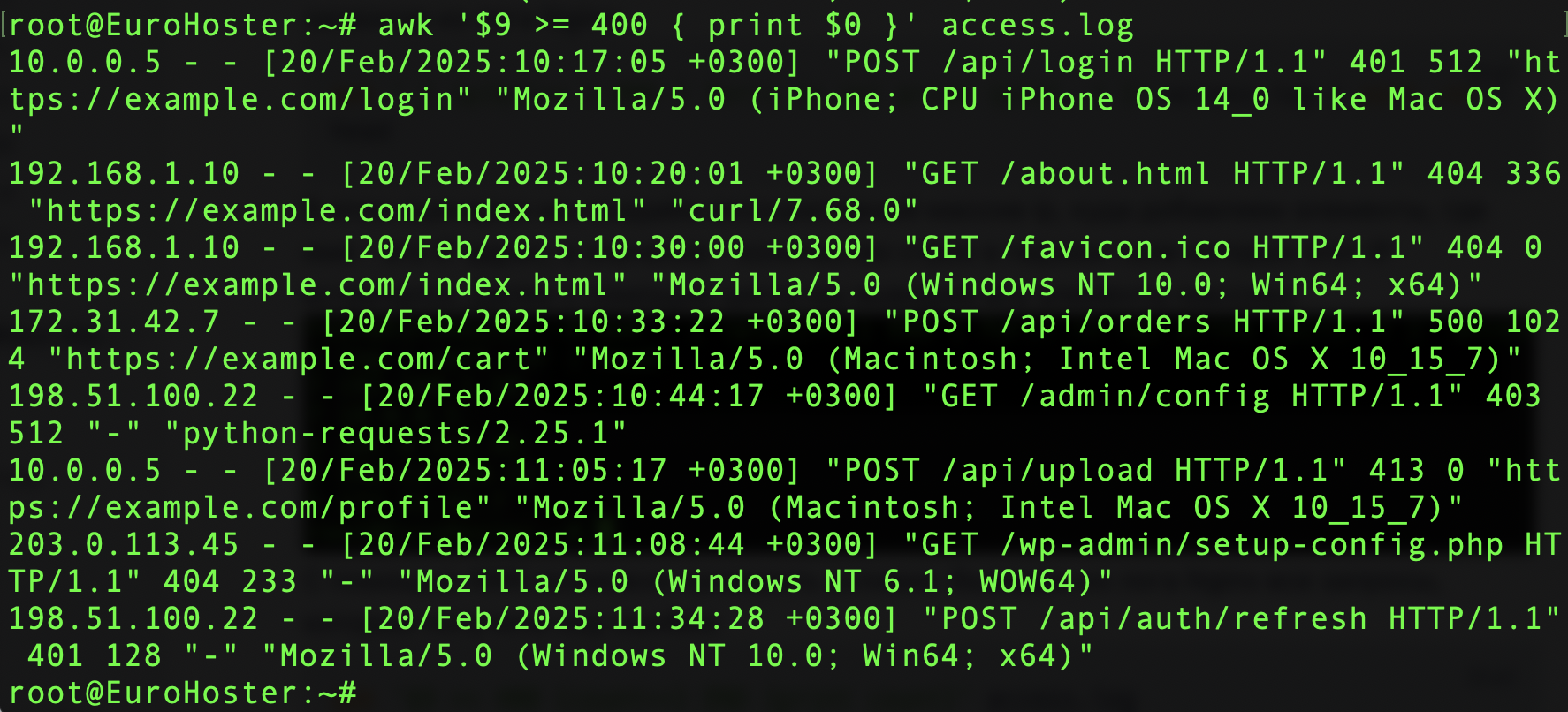
Or we can find all successful requests (code 200) to the URI /api:
awk '$7 ~ /^\/api/ && $9 == 200 {print $0}' access.logWe check whether the value of the seventh field matches a regular expression and whether the ninth field is equal to a specific value. We clearly demonstrate that AWK supports logical operators: || (logical OR), && (logical AND), and ! (negation).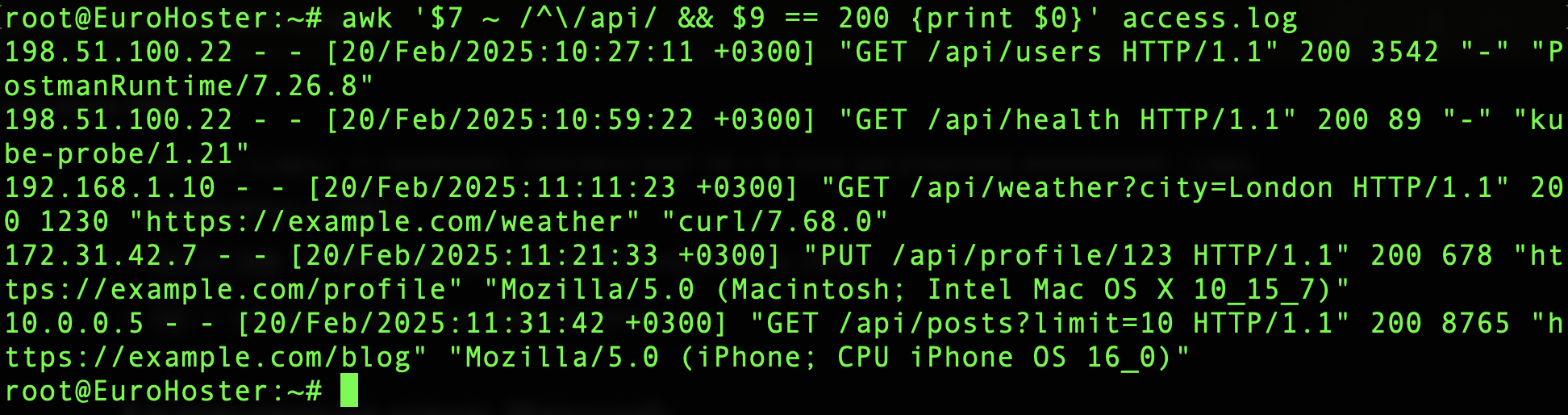
Here's a useful example: let's find the most visited URLs from the Nginx log:
awk '{ url[$7]++ } END { for(u in url) print url[u], u }' access.log | sort -nr | headIn the main block of the script, AWK creates and populates the url array with the value of the seventh field ($7). After the main block executes, the utility outputs the number of hits and the URL itself using a for loop. The sort -nr command sorts the input data as numbers and reverses the sort order. head prints the first 10 lines.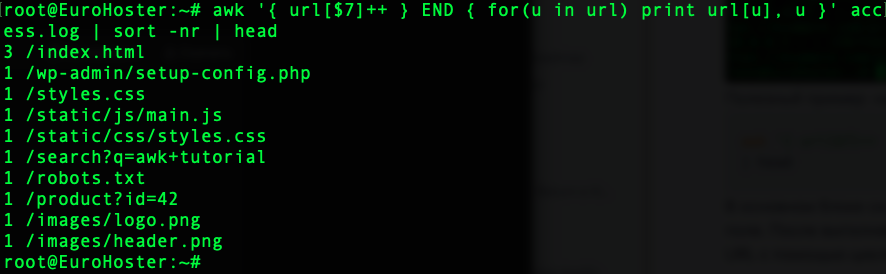
There are also more interesting, yet simple, examples. Let’s find the processes that are using more than 50% of the CPU:
ps aux | awk '$3 > 50'
Or we can find processes that are using more than 500 MB of RAM:
ps aux | awk '$6 > 500000 {print $2, $11, $6}'We generate the output ourselves, displaying only the 2nd, 11th, and 6th fields, and comparing the 6th field.
Continuing with the topic of mathematics, we can also calculate the average value for a column. For example, suppose we have a file named users.txt containing user data in the following format:
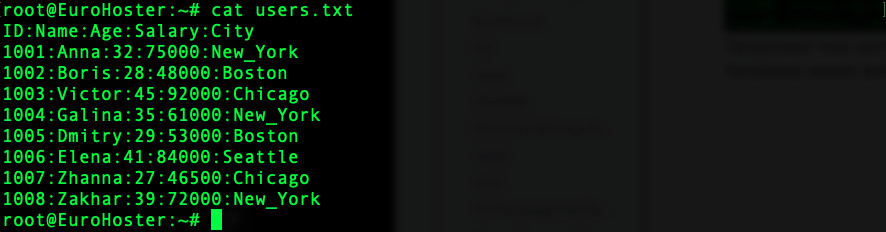
We can calculate the average salary of a user using AWK:
awk -F ':' '{ sum+=$4 } END { print "Avg. salary:", sum/(NR-1) }' users.txt- -F - sets the separator;
- sum+=$4 - sum the value of the 4th field to the variable;
- print "Avg. salary:", sum/(NR-1) - calculates the average salary and displays it.

Using AWK you can replace some basic utilities, such as head:
awk 'NR <= 5' users.txtThe command displays the first 5 lines of the users.txt file.
Let's make the command a little more complex and print lines 3 through 5:
awk 'NR >= 3 && NR <= 5' users.txt- NR - current line number.

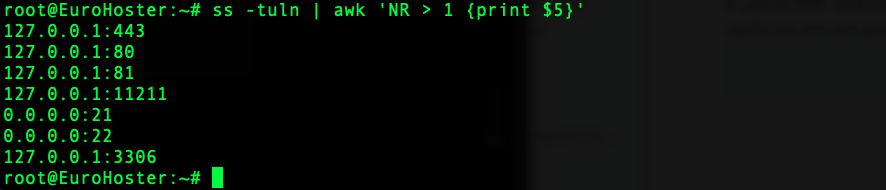
AWK is useful for formatting a command’s output into the format we need, either for convenience or for further processing. Let’s compile a list of open ports on the server:
ss -tuln | awk 'NR > 1 {print $5}'- NR > 1 - starts the output from the second line (In this case, the first line is the column name).