Nginx Rewrite and Return Directives Explained
29 May 2026, 20:51:03
Nginx (pronounced “engine-x”) is a modern web server and so much more. In fact, it powers around 35% of all websites on the internet, making it the most widely used web server today.In this article, we’ll take a closer look at two directives commonly found in the configuration of almost every modern Nginx-based website: rewrite and return.
Their purpose is to process requests, redirect users, rewrite file paths internally, and modify URLs. We’ll examine how these directives work, their syntax, common use cases, and when to use each one.
Request Processing Phases in Nginx
To understand how return and rewrite interact with requests, it’s useful to know how Nginx processes a request internally.The process is divided into 11 sequential phases:
- NGX_HTTP_POST_READ_PHASE
- NGX_HTTP_SERVER_REWRITE_PHASE
- NGX_HTTP_FIND_CONFIG_PHASE
- NGX_HTTP_REWRITE_PHASE
- NGX_HTTP_POST_REWRITE_PHASE
- NGX_HTTP_PREACCESS_PHASE
- NGX_HTTP_ACCESS_PHASE
- NGX_HTTP_POST_ACCESS_PHASE
- NGX_HTTP_PRECONTENT_PHASE
- NGX_HTTP_CONTENT_PHASE
- NGX_HTTP_LOG_PHASE
- NGX_HTTP_SERVER_REWRITE_PHASE - processes rewrite directives that are defined directly inside the server block (outside of any location);
- NGX_HTTP_FIND_CONFIG_PHASE - Nginx searches for the appropriate location block based on the request URI;
- NGX_HTTP_REWRITE_PHASE - executes rewrite directives inside the matched location;
- NGX_HTTP_POST_REWRITE_PHASE - if the URI was modified during the previous phase, the request will be sent back to find for a new matching location.
return: Fast and Simple
Syntax
return code [text];

return code URL;

return URL;- code - HTTP status code (200, 301, 302, 403, 444, etc.);
- [text] - text in quotation marks. It will be included in the body of the reply;
- URL - Redirect URL (30x codes). Will be sent in the Location header.
Context
server, location, and inside if blocks.When to Use Return
return is used when you need to perform a simple redirect or return a response without further processing the current request. It does not support regular expressions, which makes its syntax simple and easy to understand, and it is faster than rewrite. The URL value can contain variables (such as $request_uri).Redirect WWW to Non-WWW
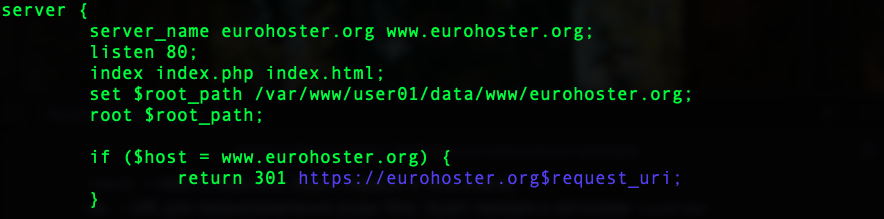
if ($host = www.domain.com) {

return 301 https://domain.com$request_uri;

}- 301 - HTTP status code (“Moved Permanently”);
- domain.com - your domain;
- $request_uri - requested URI including query parameters (for example /article.php?id=99).
Redirect HTTP to HTTPS
This redirect is commonly configured with return inside the server block of http version of the website:
return 301 https://domain.com$request_uri;It can also be implemented using if: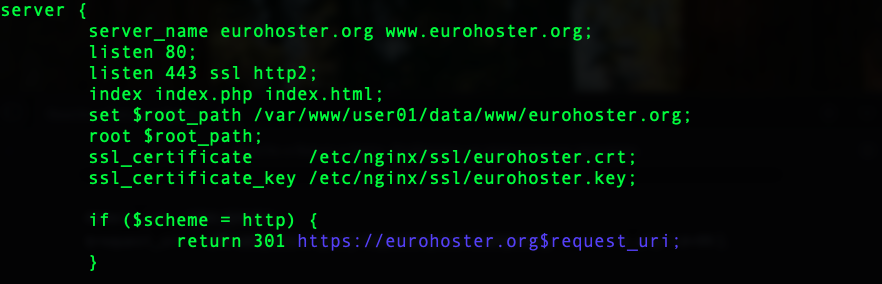
if ($scheme = http) {

return 301 https://domain.com$request_uri;

}
Redirect an Old Domain to a New One
The syntax is very similar to the HTTP -> HTTPS redirect:
server {

server_name old-domain.com;

listen 80;


return 301 https://new-domain.com$request_uri;

}
Disable Access to a Page or File Without Deleting It
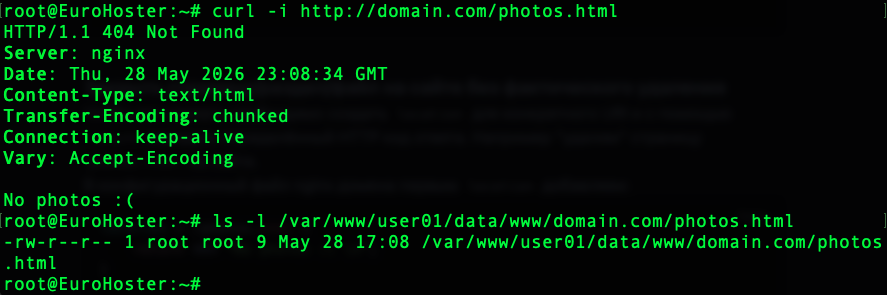
Create a dedicated location block and return the desired HTTP status code:location = /photos.html {
return 404 "No photos :( \n";
}- /photos.html - URI that triggers the rule;
- 404 - HTTP response code (“Not Found”);
- "No photos :(" - response body text. This could also be a file path, URL, or omitted entirely.
Blocking Bots and Unwanted Traffic
You can block unwanted bots by checking the client’s User-Agent header:if ($http_user_agent ~* (bot|crawler|spider|curl|wget|python|scrapy||libwww)) {
return 444;
}The User-Agent string is compared against the listed patterns. If a match is found, Nginx returns status code 444.444 is a non-standard Nginx-specific response code. Instead of sending an HTTP response, Nginx immediately closes the TCP connection without returning any data, which helps reduce unnecessary resource usage.
A user whose UA is on the list receives a connection termination error:

This is very useful for blocking junk traffic, bots, scrapers, and basic malicious requests.
Rewrite: More Powerful and Flexible
Syntax
rewrite regex replacement [flag];- regex - regular expression used to match the request URI;
- replacement - new URI;
- flag - optional parameter defining further request processing behavior:
- last - stop processing the current block and search for a new location using the rewritten URI;
- break - stop processing rewrite rules but continue handling the request inside the current location;
- redirect - send a temporary redirect (302);
- permanent - send a permanent redirect (301).
Context
server, location, if.How Rewrite Works
The rewrite directive operates on the normalized URI and does not directly process query parameters. Query arguments are preserved automatically by default:location / {
rewrite ^/user$ /user.php last;
}
You can also pass arguments explicitly using $args:location / {
rewrite ^/user$ /user.php?$args last;
}Both examples behave identically:
Adding a trailing ? disables automatic query params string forwarding:
location / {

rewrite ^/user$ /user.php? last;

}
This is exactly what happens when you manually append $args: first you disable automatic argument forwarding with ?, then add them manually.
Last vs Break
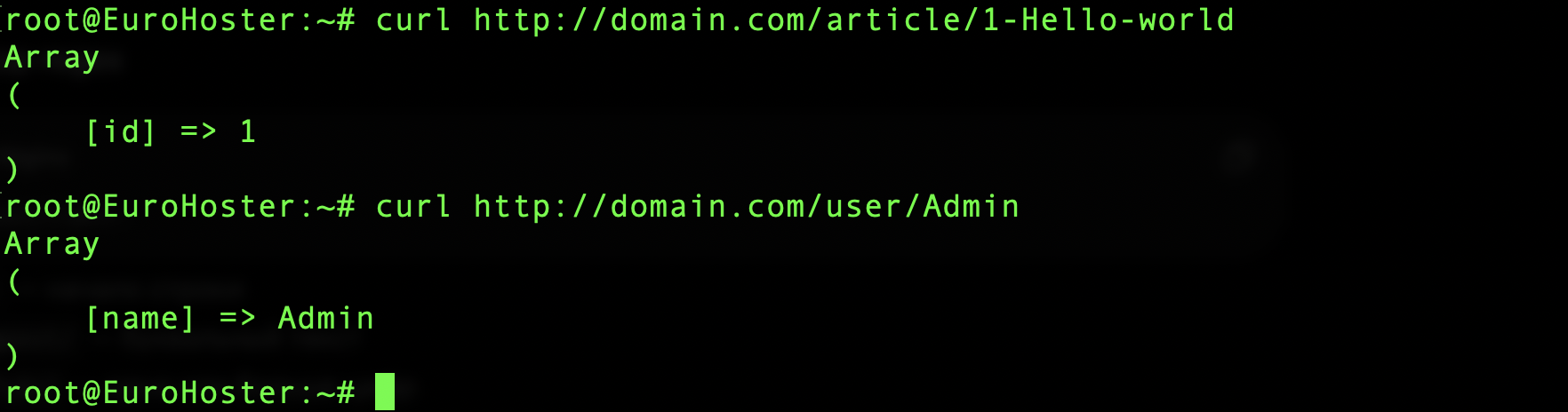
The last flag tells Nginx to stop processing rewrite rules in the current context and perform a new location lookup using the rewritten URI. Let’s look at a few classic examples.Human-Friendly URLs
location / {

rewrite ^/article/(\d+)- /article.php?id=$1 last;

rewrite ^/user/(\w+)$ /user.php?name=$1 last;

}- ^ - beginning of string (regex syntax);
- $ - end of string;
- /article/ and /user/ - text from a regular expression;
- (\d+) - one or more digits;
- (\w+) -one or more alphanumeric characters;
- - - literal dash.
WWW to Non-WWW Redirect Using Rewrite
The same redirect from earlier can also be implemented with rewrite:if ($host = www.domain.com) {
rewrite ^(.*)$ https://domain.com$1 permanent;
}- ^ - beginning of string;
- $ - end of string;
- (.*) - captures the entire URI;
- $1 - inserts the captured value;
- permanent - sends HTTP 301 (“Moved Permanently”).

The break flag also rewrites the URI, but unlike last, it does not trigger a new location search. Instead, Nginx continues processing inside the current location.
This is useful, for example, when changing file access paths:
location /iso/ {

rewrite ^/iso/(.*)$ /files/$1 break;

}
With this configuration: /iso/Windows10.iso internally becomes: /files/Windows10.iso: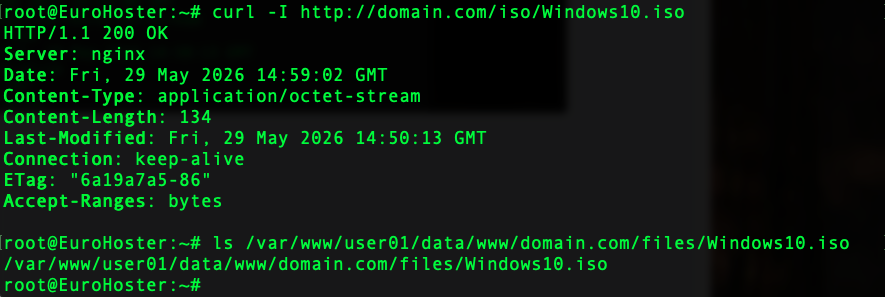
Nginx serves the file using the rewritten path while remaining inside the same location block.
Try_files as an Alternative to Rewrite
In modern frameworks such as Laravel or Symfony, the try_files directive is often a more practical alternative for checking whether files or directories exist and routing requests.A common configuration looks like this:
location / {

try_files $uri $uri/ /index.php$is_args$args;

}
In this example, Nginx checks whether the requested URI exists as:- a file ($uri);
- a directory ($uri/).
In simple terms, this allows Nginx to serve static files directly while passing all other requests to the application’s front controller.
